
ppolytools
This module implements interpolation approaches based on piecewise polynomials required for some models implemented in the HydPy framework.
The relevant models perform the interpolation during simulation runs, which is why we
implement the related methods in the Cython extension module ppolyutils.
Module ppolytools implements the following members:
- class hydpy.auxs.ppolytools.Poly(x0: float, cs: tuple[float, ...])[source]
Bases:
NamedTupleParameter handler for a power series representation of a single polynomial function.
The following
Polyobject corresponds to the polynomial function \(f(x) = 2 + 3 \cdot (x - 1) + 4 \cdot (x - 1)^2\):>>> from hydpy import Poly >>> p = Poly(x0=1.0, cs=(2.0, 3.0, 4.0))
Proper application of the constant and all coefficients for \(x = 3\) results in 24:
>>> x = 3.0
>>> p.cs[0] + p.cs[1] * (x - p.x0) + p.cs[2] * (x - p.x0) ** 2
24.0
- assignrepr(prefix: str) str[source]
Return a string representation of the actual
Polyobject prefixed with the given string.>>> from hydpy import Poly >>> poly = Poly(x0=1.0/3.0, cs=(2.0, 3.0, 4.0/3.0)) >>> poly Poly(x0=0.333333, cs=(2.0, 3.0, 1.333333)) >>> print(poly.assignrepr(prefix="poly = ")) poly = Poly(x0=0.333333, cs=(2.0, 3.0, 1.333333))
- class hydpy.auxs.ppolytools.PPoly(*polynomials: Poly, xs: Sequence[float] | ndarray[tuple[int], dtype[float64]] | None = None, ys: Sequence[float] | ndarray[tuple[int], dtype[float64]] | None = None, method: Literal['linear', 'cubic', 'akima', 'pchip'] | type[CubicHermiteSpline] = 'linear')[source]
Bases:
InterpAlgorithmPiecewise polynomial interpolator.
Class
PPolysupports univariate data interpolation via multiple polynomial functions. Typical use cases are linear or spline interpolation. The primary purpose ofPPolyis to allow for such interpolation within model equations (for example, to represent the relationship between water volume and water stage as in the modeldam_v001). Then, the user selectsPPolyas the interpolation algorithm employed by parameters derived fromSimpleInterpolator(e.g.WaterVolume2WaterLevel) orSeasonalInterpolator(e.g.WaterLevel2FloodDischarge). However, one can applyPPolyalso directly, as shown in the following examples.You can prepare a
PPolyobject by handing multiplePolyobjects to its constructor:>>> from hydpy import Poly, PPoly >>> ppoly = PPoly( ... Poly(x0=1.0, cs=(1.0,)), ... Poly(x0=2.0, cs=(1.0, 1.0)), ... Poly(x0=3.0, cs=(2.0, 3.0)), ... )
Note that each power series constant (
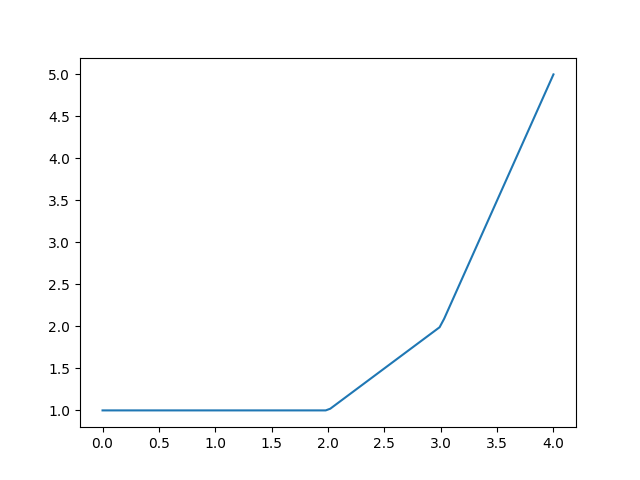
x0) also serves as a breakpoint. Eachx0value defines the lower bound of the interval for which the polynomial is valid. The only exception affects the firstPolyobject. Here,x0also serves as the power series constant but not as a breakpoint. Hence,PPolyuses the first polynomial for extrapolation into the negative range (as it uses the last polynomial for extrapolating into the positive range). The following equation, which reflects the configuration of the prepared interpolator, should clarify this definition:\[\begin{split}f(x) = \begin{cases} 1 &|\ x < 2 \\ 1 + x - 2 &|\ 2 \leq x < 3 \\ 2 + 3 \cdot (x - 3) &|\ 3 \leq x \end{cases}\end{split}\]For applying ppoly, we need to set the input value before calling
calculate_values():>>> ppoly.inputs[0] = 2.5 >>> ppoly.calculate_values() >>> from hydpy import round_ >>> round_(ppoly.outputs[0]) 1.5
The same holds when calling method
calculate_derivatives()for calculating first order derivatives:>>> ppoly.calculate_derivatives(0) >>> round_(ppoly.output_derivatives[0]) 1.0
Use method
print_table()or methodplot()to inspect the results of ppoly within the relevant data range:>>> ppoly.print_table([0.5, 1.0, 1.5, 2.0, 2.5, 3.0, 3.5]) x y dy/dx 0.5 1.0 0.0 1.0 1.0 0.0 1.5 1.0 0.0 2.0 1.0 1.0 2.5 1.5 1.0 3.0 2.0 3.0 3.5 3.5 3.0
>>> figure = ppoly.plot(xmin=0.0, xmax=4.0)
>>> from hydpy.core.testtools import save_autofig
>>> save_autofig("PPoly_base_example.png", figure=figure)
PPolycollects all constants and coefficients and provides access to them via propertiesx0sandcsavailable:>>> from hydpy import print_matrix, print_vector >>> print_vector(ppoly.x0s) 1.0, 2.0, 3.0 >>> print_matrix(ppoly.cs) | 1.0, 0.0 | | 1.0, 1.0 | | 2.0, 3.0 |
Property
nmb_psreflects the total number of polynomials:>>> ppoly.nmb_ps 3
Property
nmb_csinforms about the number of relevant coefficients for each polynomial (the last non-negative coefficient is the last relevant one):>>> print_vector(ppoly.nmb_cs) 1, 2, 2
You are free to manipulate both the breakpoints and the coefficients:
>>> ppoly.x0s = 1.0, 2.0, 2.5
>>> ppoly.cs[1, 1] = 2.0
>>> ppoly.polynomials
(Poly(x0=1.0, cs=(1.0,)), Poly(x0=2.0, cs=(1.0, 2.0)), Poly(x0=2.5, cs=(2.0, 3.0)))
>>> ppoly.print_table([0.5, 1.0, 1.5, 2.0, 2.5, 3.0, 3.5])
x    y    dy/dx
0.5  1.0  0.0
1.0  1.0  0.0
1.5  1.0  0.0
2.0  1.0  2.0
2.5  2.0  3.0
3.0  3.5  3.0
3.5  5.0  3.0
However, be aware that manipulating
nmb_ps,nmb_cs,x0s,nmb_cscan cause severe problems, including program crashes. Hence, you should always call theverify()method after manipulating these properties, which checks the integrity of the current configuration ofPPolyobjects:>>> ppoly.nmb_ps = 1 >>> ppoly.verify() Traceback (most recent call last): ... RuntimeError: While trying to verify the selected `PPoly` instance, the following error occurred: The number of constants indicated by `nmb_ps` (1) does not agree with the actual number of constants held by vector `x0s` (3).
To change an existing
PPolyobject more safely, you can “call” it with differentPolyobjects, which overwrites all current information, as shown by the following example, defining only a single polynomial:>>> ppoly(Poly(x0=-1.0, cs=(0.0, 0.0, 1.0))) >>> ppoly.print_table([-3.0, -2.0, -1.0, 0.0, 1.0]) x y dy/dx -3.0 4.0 -4.0 -2.0 1.0 -2.0 -1.0 0.0 0.0 0.0 1.0 2.0 1.0 4.0 4.0
Instead of defining the polynomials directly, you can let
PPolyestimate them from x-y data. Therefore, pass the data via the keyword arguments xs and ys and, optionally, select an interpolation approach via the keyword argument method (see methodfrom_data()for more information). This works when calling an existingPPolyobject:>>> ppoly(xs=[0.0, 1.0, 3.0], ys=[2.0, 5.0, 6.0]) >>> ppoly.polynomials (Poly(x0=0.0, cs=(2.0, 3.0)), Poly(x0=1.0, cs=(5.0, 0.5)))
It also works when creating a new one:
>>> PPoly(xs=[0.0, 1.0], ys=[2.0, 5.0]).polynomials
(Poly(x0=0.0, cs=(2.0, 3.0)),)
In such cases, the string representation of
PPolyobjects shows the original data instead of the estimated polynomials (see methodassignrepr()):>>> ppoly PPoly( xs=[0.0, 1.0, 3.0], ys=[2.0, 5.0, 6.0], )
Calling
PPolyobjects without any arguments results in the following error:>>> ppoly() Traceback (most recent call last): ... TypeError: You must either define the piecewise polynomials directly by passing `Poly` instances, or provide the data required for estimating them.
You cannot pass
Polyobjects and x-y data at the same time:>>> ppoly(Poly(x0=0.0, cs=(1.0,)), xs=[0.0], ys=[1.0]) Traceback (most recent call last): ... TypeError: You must either define the piecewise polynomials directly by passing `Poly` instances, or provide the data required for estimating them, but not both.
Estimating polynomials requires both x and y data:
>>> ppoly(xs=[0.0, 1.0])
Traceback (most recent call last):
...
TypeError: Estimating piecewise polynomials requires both x and y data.
The constructor performs the same checks. The only exception is that it allows creating
PPolyobjects without any arguments, which you must configure afterwards (for example, by calling them as shown above):>>> PPoly(xs=[0.0, 1.0]) Traceback (most recent call last): ... TypeError: Estimating piecewise polynomials requires both x and y data.
- classmethod from_polynomials(*polynomials: Poly) Self[source]
Prepare a
PPolyobject based on the givenPolyobjects.Method
from_polynomials()is an alternative to passingPolyobjects to the constructor of classPPoly:>>> from hydpy import Poly, PPoly >>> PPoly.from_polynomials( ... Poly(x0=1.0, cs=(1.0,)), Poly(x0=2.0, cs=(1.0, 1.0)) ... ) PPoly( Poly(x0=1.0, cs=(1.0,)), Poly(x0=2.0, cs=(1.0, 1.0)), )
In contrast to the constructor, which also allows for creating not-configured
PPolyobjects, methodfrom_polynomials()requires at least onePolyobject:>>> PPoly.from_polynomials() Traceback (most recent call last): ... TypeError: You must provide at least one `Poly` instance.
- classmethod from_data(xs: Sequence[float] | ndarray[tuple[int], dtype[float64]], ys: Sequence[float] | ndarray[tuple[int], dtype[float64]], method: Literal['linear', 'cubic', 'akima', 'pchip'] | type[CubicHermiteSpline] = 'linear') Self[source]
Prepare a
PPolyobject based on x-y data.As explained in the main documentation on class
PPoly, you are free to define an arbitrary number of polynomials, each with arbitrary constants and coefficients. However, one usually prefers functionally similar polynomials that standardised algorithms can compute. Methodfrom_data()is a convenience function for following this route. So far, it supports linear interpolation and some spline techniques.We start our explanations with a small and smooth x-y data set:
>>> xs = [1.0, 2.0, 3.0]
>>> ys = [1.0, 2.0, 3.5]
By default, method
from_data()prepares everything for a piecewise linear interpolation:>>> from hydpy import PPoly >>> ppoly = PPoly.from_data(xs=xs, ys=ys) >>> for poly in ppoly.polynomials: ... print(poly) Poly(x0=1.0, cs=(1.0, 1.0)) Poly(x0=2.0, cs=(2.0, 1.5)) >>> ppoly.print_table(xs=[1.9, 2.0, 2.1]) x y dy/dx 1.9 1.9 1.0 2.0 2.0 1.5 2.1 2.15 1.5 >>> figure = ppoly.plot(0.0, 4.0, label="linear")
The string representation of ppoly does not list these polynomials but the original data (see method
assignrepr()):>>> ppoly PPoly( xs=[1.0, 2.0, 3.0], ys=[1.0, 2.0, 3.5], )
Alternatively,
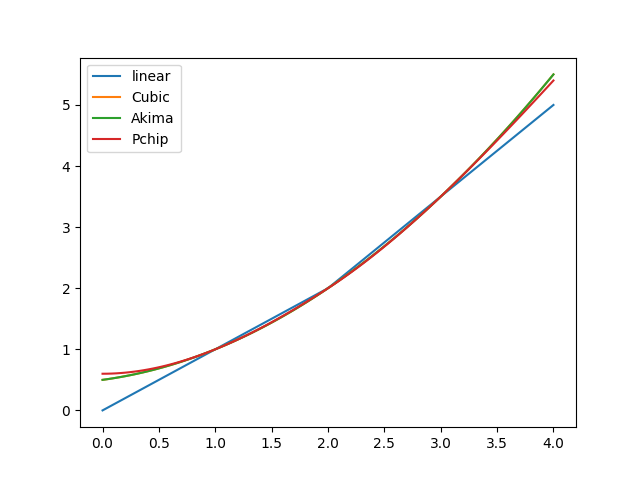
PPolycan use thescipyclasses CubicSpline, Akima1DInterpolator, and PchipInterpolator for determining higher-order polynomials. Select them via the strings “cubic”, “akima”, and “pchip”.For sufficiently smooth data, cubic spline interpolation is often a good choice, as it preserves much smoothness around breakpoints (helpful for reaching required accuracies when applying numerical integration algorithms):
>>> ppoly = PPoly.from_data(xs=xs, ys=ys, method="cubic")
>>> for poly in ppoly.polynomials:
...     print(poly)
Poly(x0=1.0, cs=(1.0, 0.75, 0.25))
Poly(x0=2.0, cs=(2.0, 1.25, 0.25))
>>> ppoly.print_table(xs=[1.9, 2.0, 2.1])
x    y       dy/dx
1.9  1.8775  1.2
2.0  2.0     1.25
2.1  2.1275  1.3
>>> figure = ppoly.plot(0.0, 4.0, label="Cubic")
For non-linear interpolation methods, the string representation also includes the method’s name:
>>> ppoly
PPoly(
    xs=[1.0, 2.0, 3.0],
    ys=[1.0, 2.0, 3.5],
    method="cubic",
)
For the given data, the Akima spline results in the same coefficients as the cubic spline:
>>> ppoly = PPoly.from_data(xs=xs, ys=ys, method="akima")
>>> for poly in ppoly.polynomials:
...     print(poly)
Poly(x0=1.0, cs=(1.0, 0.75, 0.25))
Poly(x0=2.0, cs=(2.0, 1.25, 0.25))
>>> figure = ppoly.plot(0.0, 4.0, label="Akima")
The PCHIP (Piecewise Cubic Hermite Interpolating Polynomial) algorithm generally tends to produce less smooth interpolations:
>>> ppoly = PPoly.from_data(xs=xs, ys=ys, method="pchip")
>>> for poly in ppoly.polynomials:
...     print(poly)
Poly(x0=1.0, cs=(1.0, 0.75, 0.3, -0.05))
Poly(x0=2.0, cs=(2.0, 1.2, 0.35, -0.05))
>>> ppoly.print_table(xs=[1.9, 2.0, 2.1])
x    y        dy/dx
1.9  1.88155  1.1685
2.0  2.0      1.2
2.1  2.12345  1.2685
>>> figure = ppoly.plot(0.0, 4.0, label="Pchip")
The following figure compares the linear and all spline interpolation results. As expected, the most sensible differences show in the interpolation ranges:
>>> _ = figure.gca().legend()
>>> from hydpy.core.testtools import save_autofig
>>> save_autofig("PPoly_data_smooth.png")
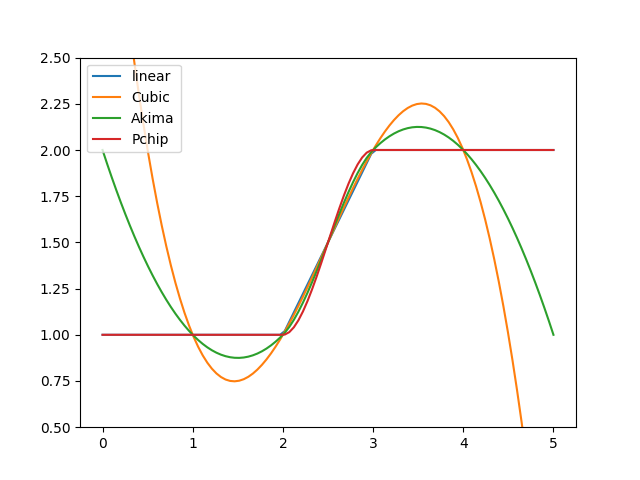
Next, we apply all four interpolation approaches to a non-smooth data set. Cubic interpolation is again the smoothest one but tends to overshoot, which can be problematic when violating physical constraints. Besides the linear approach, only the PCHIP interpolation always preserves monotonicity in the original data. The Akima interpolation appears as a good compromise between these two approaches:
>>> for method in ("linear", "cubic", "akima", "pchip"):
...     figure = PPoly.from_data(
...         xs=[1.0, 2.0, 3.0, 4.0], ys=[1.0, 1.0, 2.0, 2.0], method=method
...     ).plot(0.0, 5.0, label=method)
>>> _ = figure.gca().legend()
>>> _ = figure.gca().set_ylim((0.5, 2.5))
>>> save_autofig("PPoly_data_not_smooth.png")
Instead of strings, you can also pass the mentioned
scipyclasses themselves.PPolyrecognises them and handles them like the corresponding strings:>>> from scipy.interpolate import CubicSpline >>> PPoly.from_data(xs=xs, ys=ys, method=CubicSpline) PPoly( xs=[1.0, 2.0, 3.0], ys=[1.0, 2.0, 3.5], method="cubic", )
You can even pass other subclasses of
scipy’s CubicHermiteSpline class. However, the string representation then falls back to listing the estimated polynomials:>>> class MySpline(CubicSpline): ... pass >>> PPoly.from_data(xs=xs, ys=ys, method=MySpline) PPoly( Poly(x0=1.0, cs=(1.0, 0.75, 0.25)), Poly(x0=2.0, cs=(2.0, 1.25, 0.25)), )
Unknown method names and wrong classes result in the following error:
>>> PPoly.from_data(xs=xs, ys=ys, method="spline")
Traceback (most recent call last):
...
ValueError: While trying to derive polynomials from the vectors `x` ([1.0, 2.0, and 3.0]) and `y` ([1.0, 2.0, and 3.5]), the following error occurred: `spline` is not a supported interpolation method.  Please select "linear", "cubic", "akima", or "pchip" or pass a subclass of SciPy's `CubicHermiteSpline` class.
PPolyalso checks the type of the method argument, even if the given data set contains so few x-y pairs that it does not need a spline at all:>>> class MyOtherSpline: ... pass >>> PPoly.from_data(xs=[0.0, 1.0], ys=[2.0, 5.0], method=MyOtherSpline) Traceback (most recent call last): ... TypeError: While trying to derive polynomials from the vectors `x` ([0.0 and 1.0]) and `y` ([2.0 and 5.0]), the following error occurred: `MyOtherSpline` is not a supported interpolation method. Please select "linear", "cubic", "akima", or "pchip" or pass a subclass of SciPy's `CubicHermiteSpline` class.
Passing data sets with one or two x-y pairs works fine:
>>> PPoly.from_data(xs=[0.0], ys=[1.0]).polynomials
(Poly(x0=0.0, cs=(1.0,)),)
>>> PPoly.from_data(xs=[0.0, 1.0], ys=[2.0, 5.0]).polynomials
(Poly(x0=0.0, cs=(2.0, 3.0)),)
Empty data sets or data sets of different lengths result in the following error messages:
>>> PPoly.from_data(xs=[], ys=[])
Traceback (most recent call last):
...
ValueError: While trying to derive polynomials from the vectors `x` ([]) and `y` ([]), the following error occurred: Vectors `x` and `y` must not be empty.
>>> PPoly.from_data(xs=[0.0, 1.0], ys=[1.0, 2.0, 3.0])
Traceback (most recent call last):
...
ValueError: While trying to derive polynomials from the vectors `x` ([0.0 and 1.0]) and `y` ([1.0, 2.0, and 3.0]), the following error occurred: The lenghts of vectors `x` (2) and `y` (3) must be identical.
- nmb_inputs: BaseProperty[Never, int]
The number of input values.
- nmb_outputs: BaseProperty[Never, int]
The lastly calculated output values.
- outputs: BaseProperty[Never, ndarray[tuple[int], dtype[float64]]]
The lastly calculated output values.
- output_derivatives: BaseProperty[Never, ndarray[tuple[int], dtype[float64]]]
The lastly calculated first-order derivatives.
- nmb_ps
The number of polynomials.
nmb_psis “protected” (implemented byProtectedProperty) for the sake of preventing segmentation faults when trying to access the related data from the underlying Cython extension class before allocation:>>> from hydpy import PPoly >>> ppoly = PPoly() >>> ppoly.nmb_ps = 1 >>> ppoly.nmb_ps 1 >>> del ppoly.nmb_ps >>> ppoly.nmb_ps Traceback (most recent call last): ... hydpy.core.exceptiontools.AttributeNotReady: Attribute `nmb_ps` of object `ppoly` has not been prepared so far.
- nmb_cs
The number of relevant coefficients for each polynomial.
nmb_csis “protected” (implemented byProtectedProperty) for the sake of preventing segmentation faults when trying to access the related data from the underlying Cython extension class before allocation:>>> from hydpy import PPoly, print_vector >>> ppoly = PPoly() >>> ppoly.nmb_cs = 1, 2 >>> print_vector(ppoly.nmb_cs) 1, 2 >>> del ppoly.nmb_cs >>> ppoly.nmb_cs Traceback (most recent call last): ... hydpy.core.exceptiontools.AttributeNotReady: Attribute `nmb_cs` of object `ppoly` has not been prepared so far.
- x0s
The power series constants of all polynomials.
x0sis “protected” (implemented byProtectedProperty) for the sake of preventing segmentation faults when trying to access the related data from the underlying Cython extension class before allocation:>>> from hydpy import PPoly, print_vector >>> ppoly = PPoly() >>> ppoly.x0s = 1.0, 2.0 >>> print_vector(ppoly.x0s) 1.0, 2.0 >>> del ppoly.x0s >>> ppoly.x0s Traceback (most recent call last): ... hydpy.core.exceptiontools.AttributeNotReady: Attribute `x0s` of object `ppoly` has not been prepared so far.
- cs
The power series coefficients of all polynomials.
csis “protected” (implemented byProtectedProperty) for the sake of preventing segmentation faults when trying to access the related data from the underlying Cython extension class before allocation:>>> from hydpy import PPoly, print_matrix >>> ppoly = PPoly() >>> ppoly.cs = [[1.0, 2.0], [3.0, 4.0]] >>> print_matrix(ppoly.cs) | 1.0, 2.0 | | 3.0, 4.0 | >>> del ppoly.cs >>> ppoly.cs Traceback (most recent call last): ... hydpy.core.exceptiontools.AttributeNotReady: Attribute `cs` of object `ppoly` has not been prepared so far.
- calculate_values() None[source]
Calculate the output value based on the input values defined previously.
For more information, see the documentation on class
PPoly.
- calculate_derivatives(idx: int = 0, /) None[source]
Calculate the derivative of the output value with respect to the input value.
For more information, see the documentation on class
PPoly.
- property polynomials: tuple[Poly, ...]
The configuration of the current
PPolyobject, represented by a tuple ofPolyobjects.>>> from hydpy import Poly, PPoly >>> ppoly = PPoly(Poly(x0=1.0, cs=(1.0,)), Poly(x0=2.0, cs=(1.0, 1.0))) >>> ppoly.polynomials (Poly(x0=1.0, cs=(1.0,)), Poly(x0=2.0, cs=(1.0, 1.0)))
- sort() None[source]
Sort the currently handled polynomials.
The power series constants held by array
x0salso serve as breakpoints, defining the lower bounds of the intervals for which the available polynomials are valid. The algorithm underlyingPPolyexpects them in sorted order.In the following example, we hand over two wrongly-ordered
Polyobjects:>>> from hydpy import Poly, PPoly, print_matrix, print_vector >>> ppoly = PPoly(Poly(x0=2.0, cs=(1.0, 1.0)), Poly(x0=1.0, cs=(1.0,))) >>> ppoly.polynomials (Poly(x0=2.0, cs=(1.0, 1.0)), Poly(x0=1.0, cs=(1.0,))) >>> print_vector(ppoly.x0s) 2.0, 1.0 >>> print_vector(ppoly.nmb_cs) 2, 1 >>> print_matrix(ppoly.cs) | 1.0, 1.0 | | 1.0, 0.0 |
Method
sort()sortsx0sand the related arraysnmb_csandcs:>>> ppoly.sort() >>> ppoly.polynomials (Poly(x0=1.0, cs=(1.0,)), Poly(x0=2.0, cs=(1.0, 1.0))) >>> print_vector(ppoly.x0s) 1.0, 2.0 >>> print_vector(ppoly.nmb_cs) 1, 2 >>> print_matrix(ppoly.cs) | 1.0, 0.0 | | 1.0, 1.0 |
- verify(add_prefix: bool = True) None[source]
Raise a
RuntimeErrorif the currentPPolyobject shows inconsistencies.Note that
PPolynever callsverify()automatically. Hence, we strongly advise applying it manually before using a newPPolyconfiguration the first time.So far, method
verify()reports the following problems:>>> from hydpy import PPoly >>> ppoly = PPoly(Poly(x0=2.0, cs=(1.0, 1.0)), Poly(x0=1.0, cs=(1.0,))) >>> ppoly.verify() Traceback (most recent call last): ... RuntimeError: While trying to verify the selected `PPoly` instance, the following error occurred: The constants held in vector `x0s` are not strictly increasing, which is necessary as they also serve as breakpoints for selecting the relevant polynomials.
>>> ppoly.sort()
>>> ppoly.verify()
>>> ppoly.nmb_cs[1] = 3
>>> ppoly.verify()
Traceback (most recent call last):
...
RuntimeError: While trying to verify the selected `PPoly` instance, the following error occurred: The highest number of coefficients indicated by `nmb_cs` (3) is larger than the possible number of coefficients storable in the coefficient matrix `cs` (2).
>>> ppoly.cs = ppoly.cs[:1, :]
>>> ppoly.verify()
Traceback (most recent call last):
...
RuntimeError: While trying to verify the selected `PPoly` instance, the following error occurred: The number of polynomials indicated by `nmb_ps` (2) does not agree with the actual number of coefficient arrays held by matrix `cs` (1).
>>> ppoly.x0s = ppoly.x0s[:1]
>>> ppoly.verify()
Traceback (most recent call last):
...
RuntimeError: While trying to verify the selected `PPoly` instance, the following error occurred: The number of constants indicated by `nmb_ps` (2) does not agree with the actual number of constants held by vector `x0s` (1).
- assignrepr(prefix: str, indent: int = 0) str[source]
Return a string representation of the actual
PPolyobject prefixed with the given string.If you define the polynomials directly, the string representation lists the corresponding
Polyobjects:>>> from hydpy import Poly, PPoly >>> ppoly = PPoly(Poly(x0=1.0, cs=(1.0,)), Poly(x0=2.0, cs=(1.0, 1.0))) >>> ppoly PPoly( Poly(x0=1.0, cs=(1.0,)), Poly(x0=2.0, cs=(1.0, 1.0)), ) >>> print(ppoly.assignrepr(prefix=" ppoly = ", indent=4)) ppoly = PPoly( Poly(x0=1.0, cs=(1.0,)), Poly(x0=2.0, cs=(1.0, 1.0)), )
If you let
PPolyestimate the polynomials from x-y data, the string representation shows this data instead, which is usually easier to understand. It includes the selected interpolation method only if it is not the default one (linear):>>> ppoly = PPoly(xs=[1.0, 2.0, 3.0], ys=[1.0, 2.0, 3.5]) >>> ppoly PPoly( xs=[1.0, 2.0, 3.0], ys=[1.0, 2.0, 3.5], ) >>> ppoly(xs=[1.0, 2.0, 3.0], ys=[1.0, 2.0, 3.5], method="pchip") >>> print(ppoly.assignrepr(prefix=" ppoly = ", indent=4)) ppoly = PPoly( xs=[1.0, 2.0, 3.0], ys=[1.0, 2.0, 3.5], method="pchip", )
Long data vectors are wrapped:
>>> PPoly(xs=range(30), ys=range(30))
PPoly(
    xs=[0.0, 1.0, 2.0, 3.0, 4.0, 5.0, 6.0, 7.0, 8.0, 9.0, 10.0, 11.0, 12.0,
        13.0, 14.0, 15.0, 16.0, 17.0, 18.0, 19.0, 20.0, 21.0, 22.0, 23.0, 24.0,
        25.0, 26.0, 27.0, 28.0, 29.0],
    ys=[0.0, 1.0, 2.0, 3.0, 4.0, 5.0, 6.0, 7.0, 8.0, 9.0, 10.0, 11.0, 12.0,
        13.0, 14.0, 15.0, 16.0, 17.0, 18.0, 19.0, 20.0, 21.0, 22.0, 23.0, 24.0,
        25.0, 26.0, 27.0, 28.0, 29.0],
)
The string representation must allow for recreating
PPolyobjects (for example, when reading control files). Hence, it ignores theellipsisoption:>>> from hydpy import pub >>> with pub.options.ellipsis(1): ... PPoly(xs=[0.0, 1.0, 2.0, 3.0], ys=[0.0, 1.0, 4.0, 9.0]) PPoly( xs=[0.0, 1.0, 2.0, 3.0], ys=[0.0, 1.0, 4.0, 9.0], )
PPolyconverts the given data to 64-bit floating-point numbers before estimating the polynomials, so other data types produce consistent string representations, too:>>> import numpy >>> PPoly( ... xs=numpy.array([0.0, 0.3, 1.0], dtype=numpy.float32), ... ys=numpy.array([0.0, 0.7, 0.9], dtype=numpy.float32), ... ) PPoly( xs=[0.0, 0.3, 1.0], ys=[0.0, 0.7, 0.9], )
The same holds for data containing
nanvalues or duplicate x values, which result in useless polynomials but, at least, consistent string representations:>>> from numpy import nan >>> PPoly(xs=[1.0, 2.0, 3.0], ys=[1.0, nan, 3.0]) PPoly( xs=[1.0, 2.0, 3.0], ys=[1.0, nan, 3.0], ) >>> import warnings >>> with warnings.catch_warnings(): ... warnings.simplefilter("ignore") ... duplicates = PPoly(xs=[1.0, 1.0, 2.0], ys=[1.0, 2.0, 3.0]) >>> duplicates PPoly( xs=[1.0, 1.0, 2.0], ys=[1.0, 2.0, 3.0], )
PPolyremembers the original data but cannot reconstruct it from the polynomials. Hence, if you modify the polynomials after their estimation, the string representation falls back to listingPolyobjects:>>> ppoly.cs[1, 1] = 2.0 >>> ppoly PPoly( Poly(x0=1.0, cs=(1.0, 0.75, 0.3, -0.05)), Poly(x0=2.0, cs=(2.0, 2.0, 0.35, -0.05)), )
The same holds for incompletely configured
PPolyobjects:>>> ppoly = PPoly(xs=[1.0, 2.0], ys=[1.0, 2.0]) >>> del ppoly.nmb_ps >>> ppoly PPoly( Poly(x0=1.0, cs=(1.0, 1.0)), )
- class hydpy.auxs.ppolytools.PPolysOptions(*values)[source]
Bases:
IntEnumOptions for the simplified handling of
PPolys.- REST = 1
Replace one interpolation function with calculating “the rest” (\(y_1 = x - \sum_{i=2}^n y_i\)).
- class hydpy.auxs.ppolytools.PPolys(**ppolys: PPoly | PPolysOptions)[source]
Bases:
InterpAlgorithmHandler for multiple
PPolyinstances.PPolysallows combining multiplePPolyinstances into one multi-target piecewise polynomial interpolator. It allows, for example, to configureexch_branch_rulesso that it branches river flow in an arbitrary number of directions based on different rules that all depend on the amount of current flow.The assignment of the different
PPolyinstances relies on keyword arguments. Forexch_branch_rules, each keyword argument corresponds to the name of a different outlet node. The correspondingPPolyinstances can be configured independently. You can create them with different linear or spline interpolation methods, and the x points (in this case, representing inflow) can differ (the y values, which represent the branched outflow, usually differ too, of course). The following examples demonstrate this by assuming the water arriving at a cross section is partly diverted to three nodes named branch1, branch2, and branch3, and the rest stays in the river and so reaches node main:>>> from hydpy import PPoly, PPolys >>> ppolys = PPolys( ... main=PPoly.from_data( ... xs=[0.0, 10.0, 22.0, 28.0], ys=[0.0, 10.0, 10.0, 15.0] ... ), ... branch1=PPoly.from_data(xs=[0.0, 10.0, 16.0], ys=[0.0, 0.0, 1.0]), ... branch2=PPoly.from_data( ... xs=[0.0, 10.0, 16.0, 22.0, 28.0], ys=[0.0, 0.0, 2.0, 0.0, 0.0] ... ), ... branch3=PPoly.from_data( ... xs=[0.0, 10.0, 16.0, 22.0, 28.0], ys=[0.0, 0.0, 3.0, 10.0, 10.0] ... ), ... )
PPolyssorts the givenPPolyinstances alphabetically by their names, regardless of the order of the keyword arguments. This ensures that each output value always belongs to the same name, even when differentPPolysinstances are defined with differently ordered keyword arguments. Hence, the outputs of the current example are sorted as follows:>>> tuple(ppolys.piecewisepolynomials) ('branch1', 'branch2', 'branch3', 'main')
The following test function performs the interpolation for multiple x values (inflows), checks that the water balance is maintained, and prints either the y values (branched outflow) or their derivatives (dy/dx):
>>> from hydpy import print_vector
>>> def check(print_derivatives=False):
...     for i in [
...         0.0, 2.5, 5.0, 7.5, 10.0, 13.0, 16.0, 19.0, 22.0, 25.0, 28.0, 31.0, 34.0
...     ]:
...         ppolys.inputs[0] = i
...         ppolys.calculate_values()
...         assert i == sum(ppolys.outputs), f"{i} vs {sum(ppolys.outputs)}"
...         print(i, end=": ")
...         if print_derivatives:
...             ppolys.calculate_derivatives()
...             print_vector(ppolys.output_derivatives)
...         else:
...             print_vector(ppolys.outputs)
Both the y and dy/dx values agree with the given interpolation rules and, because they are consistently defined, the water balance is maintained in both the interpolation and extrapolation ranges:
>>> check()
0.0: 0.0, 0.0, 0.0, 0.0
2.5: 0.0, 0.0, 0.0, 2.5
5.0: 0.0, 0.0, 0.0, 5.0
7.5: 0.0, 0.0, 0.0, 7.5
10.0: 0.0, 0.0, 0.0, 10.0
13.0: 0.5, 1.0, 1.5, 10.0
16.0: 1.0, 2.0, 3.0, 10.0
19.0: 1.5, 1.0, 6.5, 10.0
22.0: 2.0, 0.0, 10.0, 10.0
25.0: 2.5, 0.0, 10.0, 12.5
28.0: 3.0, 0.0, 10.0, 15.0
31.0: 3.5, 0.0, 10.0, 17.5
34.0: 4.0, 0.0, 10.0, 20.0
>>> check(print_derivatives=True)
0.0: 0.0, 0.0, 0.0, 1.0
2.5: 0.0, 0.0, 0.0, 1.0
5.0: 0.0, 0.0, 0.0, 1.0
7.5: 0.0, 0.0, 0.0, 1.0
10.0: 0.166667, 0.333333, 0.5, 0.0
13.0: 0.166667, 0.333333, 0.5, 0.0
16.0: 0.166667, -0.333333, 1.166667, 0.0
19.0: 0.166667, -0.333333, 1.166667, 0.0
22.0: 0.166667, 0.0, 0.0, 0.833333
25.0: 0.166667, 0.0, 0.0, 0.833333
28.0: 0.166667, 0.0, 0.0, 0.833333
31.0: 0.166667, 0.0, 0.0, 0.833333
34.0: 0.166667, 0.0, 0.0, 0.833333
Configuring individual
PPolyinstances with spline techniques requires special care in the extrapolation range and, when using methods prone to overshooting, even in the interpolation range. Synchronising multiplePPolyinstances to maintain the water balance can be even more demanding. Therefore,PPolysoffers theRESToption. If you use this constant instead of onePPolyinstance,PPolysapplies all definedPPolyinstances to interpolate their y values for a given x and calculates the remaining y so that the water balance closes (\(y_1 = x - \sum_{i=2}^n y_i\)). The remaining derivative is calculated accordingly (\(\frac{dy_1}{dx} = 1 - \sum_{i=2}^n \frac{dy_i}{dx}\), because \(\frac{dx}{dx} = 1\)). The following example demonstrates this for the PchipInterpolator spline method (which is not prone to overshooting and is therefore a relatively safe spline method):>>> from scipy.interpolate import PchipInterpolator >>> ppolys( ... main=PPolys.REST, ... branch1=PPoly.from_data(xs=[0.0, 10.0, 16.0], ys=[0.0, 0.0, 1.0]), ... branch2=PPoly.from_data( ... xs=[0.0, 10.0, 16.0, 22.0, 28.0], ys=[0.0, 0.0, 2.0, 0.0, 0.0] ... ), ... branch3=PPoly.from_data( ... xs=[0.0, 10.0, 16.0, 22.0, 28.0], ys=[0.0, 0.0, 3.0, 10.0, 10.0] ... ), ... supplier=PPoly.from_data( ... xs=[0.0, 8.0, 10.0], ys=[-2.0, 0.0, 0.0], method=PchipInterpolator ... ), ... )
>>> check()
0.0: 0.0, 0.0, 0.0, 2.0, -2.0
2.5: 0.0, 0.0, 0.0, 3.504395, -1.004395
5.0: 0.0, 0.0, 0.0, 5.316406, -0.316406
7.5: 0.0, 0.0, 0.0, 7.509277, -0.009277
10.0: 0.0, 0.0, 0.0, 10.0, 0.0
13.0: 0.5, 1.0, 1.5, 10.0, 0.0
16.0: 1.0, 2.0, 3.0, 10.0, 0.0
19.0: 1.5, 1.0, 6.5, 10.0, 0.0
22.0: 2.0, 0.0, 10.0, 10.0, 0.0
25.0: 2.5, 0.0, 10.0, 12.5, 0.0
28.0: 3.0, 0.0, 10.0, 15.0, 0.0
31.0: 3.5, 0.0, 10.0, 17.5, 0.0
34.0: 4.0, 0.0, 10.0, 20.0, 0.0
>>> check(print_derivatives=True)
0.0: 0.0, 0.0, 0.0, 0.55, 0.45
2.5: 0.0, 0.0, 0.0, 0.658398, 0.341602
5.0: 0.0, 0.0, 0.0, 0.796094, 0.203906
7.5: 0.0, 0.0, 0.0, 0.963086, 0.036914
10.0: 0.166667, 0.333333, 0.5, 0.0, 0.0
13.0: 0.166667, 0.333333, 0.5, 0.0, 0.0
16.0: 0.166667, -0.333333, 1.166667, 0.0, 0.0
19.0: 0.166667, -0.333333, 1.166667, 0.0, 0.0
22.0: 0.166667, 0.0, 0.0, 0.833333, 0.0
25.0: 0.166667, 0.0, 0.0, 0.833333, 0.0
28.0: 0.166667, 0.0, 0.0, 0.833333, 0.0
31.0: 0.166667, 0.0, 0.0, 0.833333, 0.0
34.0: 0.166667, 0.0, 0.0, 0.833333, 0.0
The individual
PPolyinstances are accessible via item access:>>> ppolys["branch3"] PPoly( xs=[0.0, 10.0, 16.0, 22.0, 28.0], ys=[0.0, 0.0, 3.0, 10.0, 10.0], ) >>> ppolys["branch4"] Traceback (most recent call last): ... KeyError: 'The selected `PPolys` instance does not handle an interpolator named `branch4`.'
- REST = 1
- nmb_inputs: BaseProperty[Never, int]
The number of input values.
- nmb_outputs: BaseProperty[Never, int]
The lastly calculated output values.
- outputs: BaseProperty[Never, ndarray[tuple[int], dtype[float64]]]
The lastly calculated output values.
- output_derivatives: BaseProperty[Never, ndarray[tuple[int], dtype[float64]]]
The lastly calculated first-order derivatives.
- calculate_values() None[source]
Calculate the output values based on the input value defined previously.
Before using
calculate_values(), you need to assign the requiredPPolyinstances:>>> from hydpy import PPolys, PPoly, print_vector >>> ppolys = PPolys() >>> ppolys.calculate_values() Traceback (most recent call last): ... hydpy.core.exceptiontools.AttributeNotReady: For the selected `PPolys` instance, no interpolation rules have been defined so far, which is necessary before using method `calculate_values`.
Usually, method
calculate_values()just uses the respective interpolators:>>> ppolys( ... target2=PPoly.from_data(xs=[0.0, 1.1, 2.2], ys=[0.0, 2.2, 6.6]), ... target1=PPoly.from_data(xs=[0.0, 1.1], ys=[0.0, 1.1]), ... ) >>> ppolys.inputs[0] = 2.2 >>> ppolys.calculate_values() >>> print_vector(ppolys.outputs) 2.2, 6.6
For more information, see the documentation on class
PPolys.
- calculate_derivatives(idx: int = 0, /) None[source]
Calculate the derivative of the output values with respect to the input value.
Before using
calculate_derivatives(), you need to assign the requiredPPolyinstances:>>> from hydpy import PPolys, PPoly, print_vector >>> ppolys = PPolys() >>> ppolys.calculate_derivatives() Traceback (most recent call last): ... hydpy.core.exceptiontools.AttributeNotReady: For the selected `PPolys` instance, no interpolation rules have been defined so far, which is necessary before using method `calculate_derivatives`.
Usually, method
calculate_derivatives()just uses the respective interpolators:>>> ppolys( ... target2=PPoly.from_data(xs=[0.0, 1.1, 2.2], ys=[0.0, 2.2, 6.6]), ... target1=PPoly.from_data(xs=[0.0, 1.1], ys=[0.0, 1.1]), ... ) >>> ppolys.inputs[0] = 2.2 >>> ppolys.calculate_values() >>> ppolys.calculate_derivatives() >>> print_vector(ppolys.output_derivatives) 1.0, 4.0
For more information, see the documentation on class
PPolys.
- property piecewisepolynomials: Mapping[str, PPoly | PPolysOptions]
Mapping containing the names and
PPolyinstances of the respective interpolation rules.Before accessing
piecewisepolynomials, you need to assign the requiredPPolyinstances:>>> from hydpy import PPolys, PPoly >>> ppolys = PPolys() >>> ppolys.piecewisepolynomials Traceback (most recent call last): ... hydpy.core.exceptiontools.AttributeNotReady: For the selected `PPolys` instance, no interpolation rules have been defined so far, which is necessary before accessing property `piecewisepolynomials`.
>>> ppolys(
...     target2=PPoly.from_data(xs=[0.0, 1.1, 2.2], ys=[0.0, 2.2, 6.6]),
...     target1=PPoly.from_data(xs=[0.0, 1.1], ys=[0.0, 1.1]),
... )
>>> ppolys.piecewisepolynomials["target1"]
PPoly(
    xs=[0.0, 1.1],
    ys=[0.0, 1.1],
)
>>> ppolys.piecewisepolynomials["target2"]
PPoly(
    xs=[0.0, 1.1, 2.2],
    ys=[0.0, 2.2, 6.6],
)
>>> ppolys(
...     target2=PPolys.REST,
...     target1=PPoly.from_data(xs=[0.0, 1.1], ys=[0.0, 1.1]),
... )
>>> ppolys.piecewisepolynomials["target2"]
<PPolysOptions.REST: 1>
- verify() None[source]
Raise a
RuntimeErrorif at least one of the handledPPolyobjects shows inconsistencies.Note that
PPolysnever callsverify()automatically. Hence, we strongly advise applying it manually before using a newPPolysconfiguration the first time.>>> from hydpy import PPolys, PPoly >>> ppolys = PPolys( ... target2=PPoly.from_data(xs=[0.0, 1.1, 2.2], ys=[0.0, 2.2, 6.6]), ... target1=PPoly.from_data(xs=[0.0, 1.1], ys=[0.0, 1.1]), ... ) >>> ppolys.verify()
>>> ppolys["target2"].x0s[0] = 2.2
>>> ppolys.verify()
Traceback (most recent call last):
...
RuntimeError: While trying to verify the `target2` interpolator of the selected `PPolys` instance, the following error occurred: The constants held in vector `x0s` are not strictly increasing, which is necessary as they also serve as breakpoints for selecting the relevant polynomials.
- assignrepr(prefix: str, indent: int = 0) str[source]
Return a string representation of the actual
PPolysobject prefixed with the given string.>>> from hydpy import PPolys, PPoly >>> ppolys = PPolys( ... target2=PPoly.from_data(xs=[0.0, 1.1, 2.2], ys=[0.0, 2.2, 6.6]), ... target1=PPoly.from_data(xs=[0.0, 1.1], ys=[0.0, 1.1]), ... target3=PPolys.REST, ... ) >>> ppolys PPolys( target1=PPoly( xs=[0.0, 1.1], ys=[0.0, 1.1], ), target2=PPoly( xs=[0.0, 1.1, 2.2], ys=[0.0, 2.2, 6.6], ), target3=PPolys.REST, ) >>> print(ppolys.assignrepr(prefix=" ppolys = ", indent=4)) ppolys = PPolys( target1=PPoly( xs=[0.0, 1.1], ys=[0.0, 1.1], ), target2=PPoly( xs=[0.0, 1.1, 2.2], ys=[0.0, 2.2, 6.6], ), target3=PPolys.REST, )